Newsletter · April 11, 2025
Practical Upgrades, Smarter Tools, and What You Should Know Now

This edition, we’re highlighting what matters most to schools making real tech moves. From improving front office security at Glenrock High with Verkada’s video intercom, to exploring operating system-free display solutions from Newline, this edition is packed with tools and updates that support safer, more efficient school environments.
We’ve also rounded up key insights from our trusted partners on everything from student wellness monitoring to Zero Trust network design—plus a quick check-in on what your peers are thinking when it comes to everyday challenges in tech and teamwork.
Thanks for being part of the Pine Cove community. Let’s get into it.
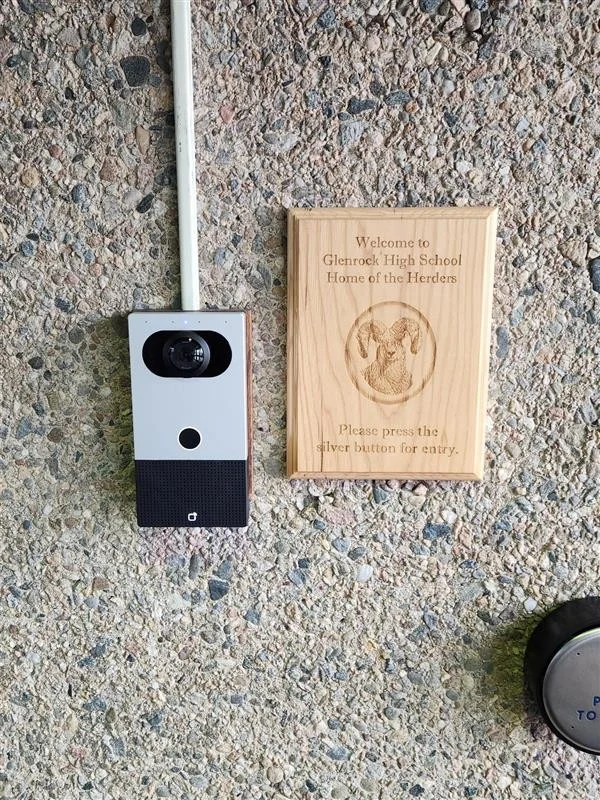
Glenrock High Gets a Smarter Front Door
We recently helped Converse County School District #2 take a big step forward in school safety. At Glenrock High School in Glenrock, Wyoming, we installed the Verkada Video Intercom—a sleek, all-in-one device that combines video surveillance, two-way communication, and remote access control.
Why It Matters:
With this new setup, front office staff can easily see and speak with visitors—then unlock the door remotely. No more guesswork. No more interruptions. Just clear communication and better control over who’s coming in.
Pine Cove Tip: Want your intercom rollout to go smoothly?
Make sure the device is mounted at eye level and clearly marked. Glenrock did this perfectly—making the experience intuitive for staff and visitors alike.
Project Snapshot
- District: Converse County School District #2
- School: Glenrock High School – Glenrock, WY
- Solution: Verkada Video Intercom
- Purpose: Streamlined, secure visitor access
- Result: Better visibility, quicker response times, simplified operations
Quick Bytes: Must-Read Articles:
- Smarter Student Support: Why Securly Aware Makes a Difference: Securly Aware helps schools move beyond basic keyword alerts with smarter, pattern-based insights into student wellness—reducing alert fatigue and enabling earlier, more effective interventions.
- Microsoft’s April Patch Roundup: 135 Vulnerabilities Addressed: This month’s Patch Tuesday was a big one—Microsoft rolled out fixes for 135 CVEs, including critical remote code execution flaws. Sophos breaks down what IT teams need to know to stay protected.
- Four Steps to Building SASE with Zero Trust, the Aruba Way: This Aruba Networks article outlines a clear, practical roadmap for implementing SASE using universal Zero Trust principles—helping IT teams simplify access, strengthen security, and future-proof their network architecture.
Newline Secure: Built for Protected, Simplified Collaboration
We’re excited to spotlight Newline Secure, a new line of interactive displays that puts security and control first—perfect for schools and government environments that prioritize compliance, privacy, and ease of use.
Unlike traditional panels, Newline Secure is completely operating system-free. That means:
- No OS vulnerabilities
- No third-party data collection
- No user tracking
You get a clean, plug-and-play display that works seamlessly with your existing devices—whether you’re running Windows, Chrome, or another platform.
Why It Matters for Schools and Public Agencies:
- FERPA and HIPAA-conscious: No data stored or shared means you stay compliant by design.
- IT-friendly: Reduces the need for patching, logins, and password resets—less work for your tech team.
- More instructional time: Teachers get fast, no-login access to display content—without tech hiccups.
Pine Cove Tip: Newline Secure is a great fit for front offices, meeting rooms, and anywhere you want display flexibility without security headaches.
Whether you're securing your learning spaces or modernizing how teams collaborate, Newline Secure offers peace of mind without compromising functionality.
Learn more about Newline Secure

Until Next Time—Stay Sharp, Stay Connected
Thanks for catching up with us. Whether you’re securing entry points, evaluating new tech, or just trying to stay ahead of the next inbox surprise, we’re here to support the work you do every day. If something in this issue sparked a question, an idea, or even a quick win on your end—we’d love to hear about it.
See you next edition with more updates from the field.