Newsletter · April 25, 2025
Practical Upgrades, Tactical Wins, and Just Enough Panic to Keep It Interesting
This week, we’re spotlighting projects and updates that matter—from getting new Verkada cameras in place at Montana Tech to tracking global cybersecurity shifts and that not-so-casual Windows 11 deadline creeping closer. We’ve also included a few painfully accurate observations from the frontlines of IT (because sometimes, humor is just troubleshooting with better timing).
Scroll down for smart reads, real wins, and reminders that even in IT, staying ahead sometimes means knowing when to laugh and when to escalate.
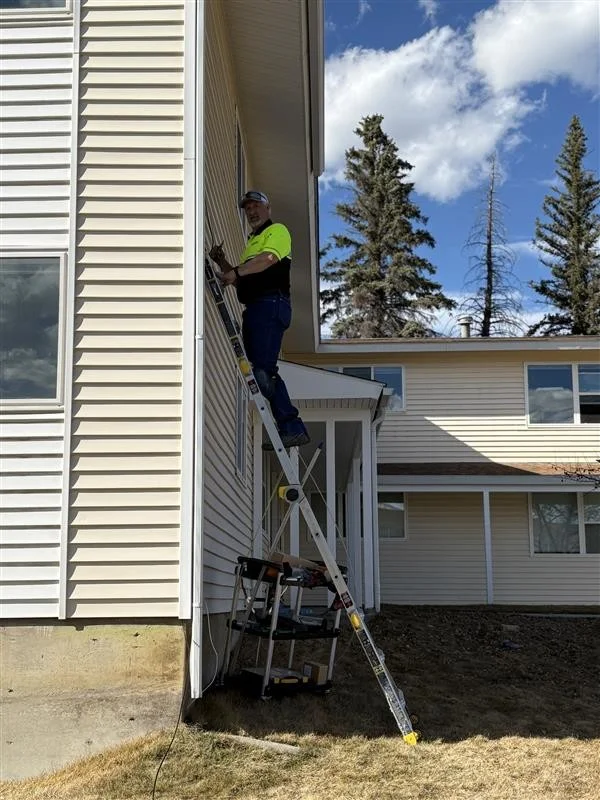
Verkada Camera Install at Montana Tech's Green Apartments
At Pine Cove, we believe secure campuses start with smart, scalable infrastructure. Our recent project at Montana Tech’s Green Apartments is a strong example of how technology can directly support campus safety. We completed the installation of Verkada external cameras to improve security for student housing, replacing outdated surveillance systems with modern, cloud-managed video technology.
Before this upgrade, the Green Apartments faced common challenges—limited visibility around high-traffic areas, manual footage retrieval, and after-hours blind spots. With Verkada’s hybrid cloud solution now in place, the campus benefits from HD video coverage, motion and people detection alerts, and remote access to footage from any device. This gives administrators the ability to respond more quickly and effectively when incidents arise.
We recommended Verkada for its intuitive interface, scalability across multi-building environments, and FERPA-conscious data handling—making it a reliable choice for educational institutions. Whether supporting K–12 districts or higher ed campuses, Pine Cove helps deploy solutions that reduce the burden on IT teams while improving safety and visibility.
Looking to upgrade your own video surveillance infrastructure? Explore our Physical Security Solutions to learn how Pine Cove can help implement scalable, cloud-managed systems—offering cameras, access control, and environmental sensors designed for schools and campuses.
Projects like this help ensure that campus teams have the tools they need to monitor key areas, respond quickly, and maintain a safe environment for students and staff.
Securly Named Preferred Tech Provider for Texas K–12
We’re always proud to work with partners who are deeply committed to student safety—and Securly continues to lead by example.
In a recent announcement, the Texas Technology Alliance for Statewide Initiatives (TASI) named Securly a preferred provider for K–12 school districts across Texas. This designation highlights Securly’s strength in delivering cloud-based safety and wellness tools that are designed specifically for education—tools that are easy to deploy, easy to manage, and deeply aligned with what districts actually need.
From content filtering and device monitoring to wellness tracking, classroom management, and parent engagement, Securly provides a comprehensive platform that supports students, teachers, and IT teams alike.
While this recognition is focused on Texas, it reflects a broader shift we’re seeing in school safety strategies across the country: a move toward platforms that integrate both digital oversight and student support. In fact, a recent survey found that 94% of districts using Securly report improved visibility into student online behavior, helping educators identify concerns earlier and respond more effectively.
For many districts, Securly complements physical safety upgrades like camera systems and access control—helping build a layered, proactive approach to campus-wide safety.
At Pine Cove, we support Securly deployments from end to end:
- Seamless integration with existing district networks
- Training and onboarding for IT teams and staff
- Ongoing support for compliance, usage analytics, and parent communication tools
Whether you’re looking to improve student safety, meet compliance standards, or bring more visibility to classroom activity, Securly can be a valuable part of your strategy—and we’re here to help you implement it with confidence.
Quick Bytes: Must-Read Articles:
- Bitdefender Launches GravityZone PHASR to Reduce Attack Surfaces: Bitdefender’s new GravityZone PHASR platform boosts protection with early warning alerts, risk analytics, and streamlined endpoint security.
- Newline Reintroduces DV Premier LED Display with COB Technology: Newline’s DV Premier display is back—now featuring COB tech for better durability, clarity, and energy efficiency in high-use environments.
- CISA Reaffirms Support for the CVE Program: CISA has confirmed continued support and funding for the CVE Program, reinforcing the reliability of this critical system for tracking software vulnerabilities.
- Ivanti Zero-Day Exploited in Targeted Attacks: A zero-day flaw in Ivanti Connect Secure was exploited to deploy malware and web shells, underscoring the need for timely patching and monitoring.

Why Global CVE Reform Matters
Sophos: Moving CVEs Past One-Nation Control
Tracking and managing software vulnerabilities is a cornerstone of any strong cybersecurity program—but most don’t realize that the global system used to identify and share those threats is currently governed by a single country. The U.S. government, through MITRE, manages the widely-used Common Vulnerabilities and Exposures (CVE) program. While effective, this centralized model has raised international concerns as cybersecurity threats grow in complexity and global reach.
In a recent article, Sophos advocates for a shift to a more decentralized, internationally governed CVE system—one that increases transparency, strengthens global collaboration, and reduces dependence on any single authority.
At Pine Cove, we follow these developments closely. While CVEs may seem like a background detail, they directly impact how quickly schools, municipalities, and other public sector organizations can identify and respond to critical threats. The more transparent and collaborative this process becomes, the better it works for teams managing multiple systems and endpoints with limited internal resources.
A quick refresher: a CVE (Common Vulnerabilities and Exposures) is a universal ID number assigned to known security flaws. It allows IT teams to quickly track, prioritize, and address vulnerabilities across different platforms. Think of it like a tracking number for cybersecurity threats.
This matters because schools and agencies increasingly rely on timely vulnerability data to patch systems and maintain compliance. In fact, many cybersecurity insurance providers and government regulations now require organizations to document CVE monitoring and response procedures.
Pro tip: Bookmark the National Vulnerability Database or subscribe to alerts for your core software stack. It’s one of the easiest ways to improve visibility and stay ahead of emerging risks.
Want to dive deeper? Read the full article from Sophos
Windows 11 Updates Are Rolling Out—Is Your Hardware Ready?
Microsoft is rolling out new features in Windows 11 this spring—and with support for Windows 10 officially ending on October 14, 2025, now is the time to evaluate your device readiness and upgrade strategy.
According to a recent article from Digital Trends, the latest Windows 11 updates include:
- AI-powered enhancements to boost productivity
- Expanded accessibility features, including live captions in over 40 languages
- Performance improvements and deeper cloud integration
But with these upgrades come stricter system requirements. Devices must meet specific hardware standards—including TPM 2.0 and compatible CPUs—to qualify for the update. Many older machines, especially in education and government settings, will not be eligible.
For IT teams still operating on Windows 10, this is a crucial window to:
- Audit current devices for upgrade compatibility
- Plan phased refreshes around budget cycles
- Align purchasing timelines with the end-of-life deadline to avoid support gaps
Windows 10 support ends on October 14, 2025, meaning Microsoft will no longer provide security updates, patches, or assistance after that date—potentially leaving unsupported systems vulnerable to threats and compliance issues.
At Pine Cove, we’re already helping districts and agencies take proactive steps. Whether you’re managing hundreds of student devices or citywide workstations, we can assist with:
- Device compatibility assessments
- Procurement planning based on your environment and budget
- Strategic rollout guidance to minimize disruption
Microsoft’s PC Health Check Tool is a good starting point for checking your fleet. If you need support interpreting results or determining your best path forward, our team is here to help.
Read the full article from Digital Trends
If you haven’t started planning your transition to Windows 11, now is the time. Let’s make sure your systems stay secure, supported, and set up for long-term success.

Until Next Time—Stay Sharp, Stay Connected
Whether you're elbows-deep in upgrade planning, untangling user tickets, or just trying to figure out why that one printer is always offline, we see you. Keep pushing forward, keep securing the stack, and don’t forget—it’s not chaos, it’s character building.
We’ll be back next edition with more updates, field-tested insights, and possibly another meme that hits a little too close to home.